

How Embedded AI in Microsoft 365 Is Reshaping Legal Artificial Intelligence
Discover how Microsoft 365 Copilot integrates legal AI securely into everyday law firm workflows.
Legal departments and modern law practices are moving past the experimental phase of automation. According to statistics from the Small Business Administration (SBA), 99.9% of US businesses are small businesses, a category that includes the vast majority of law firms, boutique practices, and independent legal consultancies. For these organizations, operational efficiency is key to staying competitive, yet many struggle to adopt complex, standalone legal technology platforms.
Instead of paying for expensive point solutions, many firms are turning to built-in tools. Embedded systems in Microsoft 365 are quickly becoming the default layer for adopting legal artificial intelligence in everyday law firm work.
By integrating large language models directly into Word, Outlook, and Teams, Microsoft 365 Copilot enables lawyers to weave automation seamlessly into daily workflows. This shifts legal tech adoption away from standalone programs and toward platforms that lawyers already understand. However, integrating HyperCounsel support alongside these embedded tools is critical to ensuring robust security, privacy, and risk governance.
Table of Contents
- Quick Summary
- The Rise of Embedded AI in Microsoft 365
- Governance, Security, and Compliance Challenges
- Evaluating Embedded AI vs. Standalone Legal Tech
- How to Safely Implement Embedded AI in Your Firm
- Take the Next Step
- Frequently Asked Questions
- Recommended
Quick Summary
| Key Takeaway | Explanation |
|---|---|
| Everyday Integration | Microsoft 365 embeds legal artificial intelligence directly into familiar tools like Word, Outlook, and Teams. |
| Immediate Productivity | Lawyers gain major time savings in summary drafting, email composition, meeting notes, and internal document search. |
| Enterprise Security Boundaries | Utilizing commercial tenancies protects sensitive client information within the firm’s isolated Microsoft cloud space. |
| Governance Is Non-Negotiable | Structuring internal data permissions prevents unauthorized access and limits administrative oversights. |
| Expert Implementation | HyperCounsel can help firms audit, organize, and launch these secure deployments. |
The Rise of Embedded AI in Microsoft 365
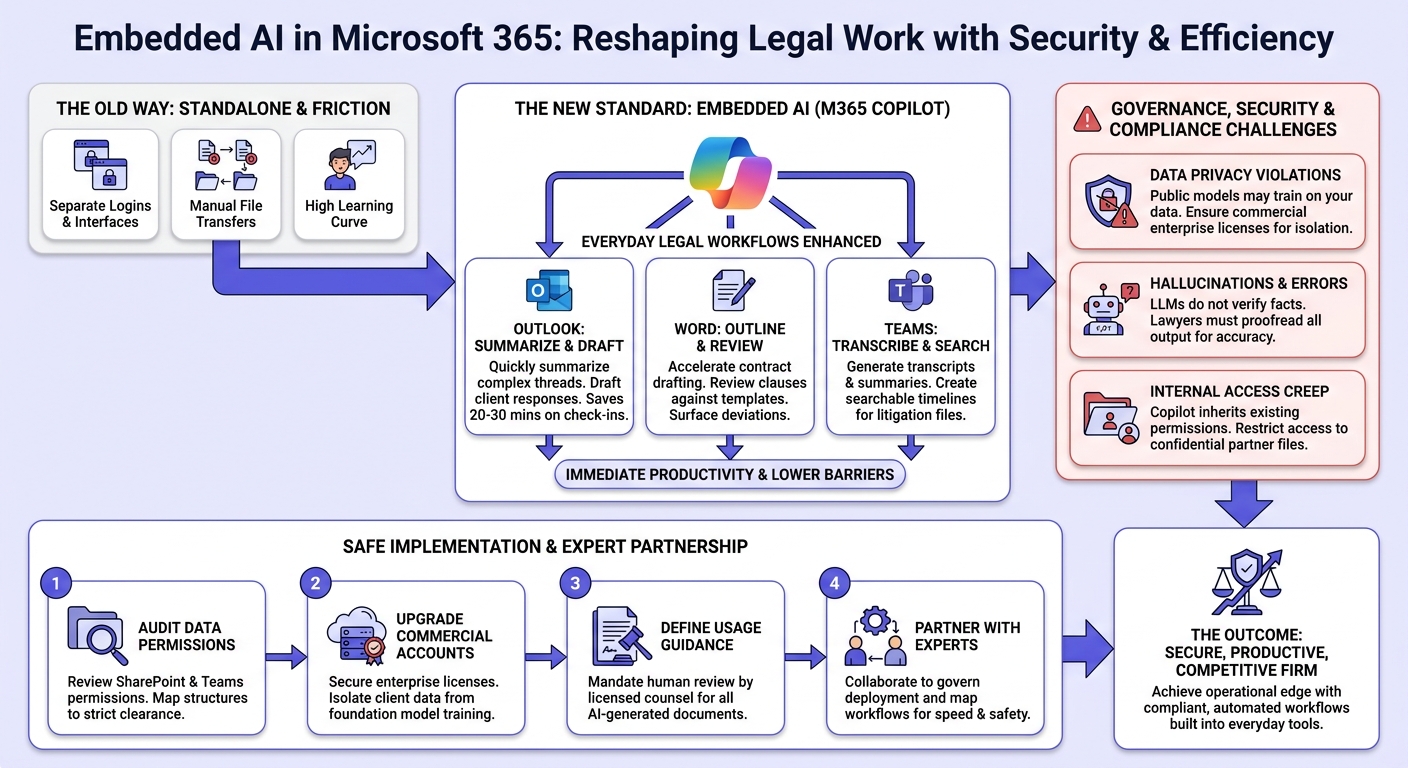
Standalone legal tech applications frequently fail because users resist learning new interfaces, managing separate logins, or manually transferring files. Incorporating administrative tools straight within the productivity suite removes these friction points. When tools are embedded, they allow lawyers to write, organize, and plan within the tools they already use hour by hour.
Integrating commercial AI directly where your legal assets live ensures that files do not need to leave your firewall to be summarized or reviewed. The transition to Microsoft 365 Copilot represents a transformation in the industry, taking high-volume processes and turning them into secure, automated single-click workflows.
The Efficiency Advantages of Embedded Systems
For boutique practices and legal teams operating under high caseloads, standalone technology can add administrative friction. Embedded platforms bypass these hurdles in distinct ways:
- Lower Training Barriers: Lawyers use the same document text windows and communication channels they are already comfortable with.
- Consistent Data Boundaries: Document analysis takes place within your standard, compliant cloud architecture rather than third-party servers.
- Unified Licensing: Leveraging existing license configurations avoids expensive point-solution subscriptions.
Everyday Legal Workflows Enhanced by Copilot
Using embedded systems allows small to mid-sized legal practices to perform heavy document lifecycles quickly.
| Microsoft 365 App | Use Case for Lawyers | Workplace Impact |
|---|---|---|
| Outlook | Summarizing complex threads; drafting client responses | Saves up to 20 to 30 minutes on client check-ins and intake logs. |
| Word | Outlining contracts; reviewing clauses against templates | Accelerates initial drafts and helps surface standard-clause deviations. |
| Teams | Generating transcripts and summaries of depositions | Creates instantly searchable administrative timelines for litigation files. |
Governance, Security, and Compliance Challenges

While native workflows deliver immediate efficiency, law firms must navigate major responsibilities around client privilege and data privacy. According to guidance issued under the NIST AI Risk Management Framework, managing professional risks is vital when relying on automated processes. Trust is the baseline of the legal profession, meaning firms must proceed with clear governance.
Additionally, administrative authorities such as the Federal Trade Commission (FTC) have placed an emphasis on accuracy, transparency, and accountability for businesses utilizing AI services.
Key Risk Areas for Law Firms
- Data Privacy Violations: Publicly accessible AI tools often use your data to train public models. To prevent this, practices must ensure they use commercial enterprise licenses where data boundaries are strictly enforced per Microsoft Copilot privacy principles.
- Hallucinations and Errors: As outlined in generative guidance by the UK National Cyber Security Centre, LLMs do not verify factual correctness. Lawyers must carefully proofread every automatically generated citation, rule outline, and client narrative.
- Internal Access Creep: Because Copilot inherits existing user permissions, an assistant or junior paralegal searching within Outlook or SharePoint could accidentally surface highly confidential firm partner files if proper access groups are not structured.
Implementing Administrative and Security Controls
To deploy embedded AI safely, IT administrators should classify directory structures and restrict information groups. This guarantees that only authorized partners can look up sensitive matters. Deploying strict, role-based folder configurations inside OneDrive and SharePoint ensures that automation tools only scan files that particular workers are cleared to see.
Evaluating Embedded AI vs. Standalone Legal Tech
Choosing between point-solutions and integrated Microsoft 365 features requires evaluating cost, usability, and data security.
| Evaluation Metric | Embedded Copilot (M365) | Standalone Legal AI Software |
|---|---|---|
| Daily Usability | High; natively responsive inside active document workflows. | Medium; requires importing files into a separate portal. |
| Data Boundaries | Kept inside the firm’s tenant. | Managed externally on the software product’s servers. |
| Integration Work | Zero; automatically reads local email, files, and chats. | High; API credentials and special integrations are required. |
| Implementation Cost | Fixed pricing based on active license upgrades. | Typically high per-user enterprise licensing tiers. |
How to Safely Implement Embedded AI in Your Firm
Firms looking to operationalize legal artificial intelligence safely within Microsoft 365 should execute a structured rollout process.
- Step 1: Audit Data Permissions: Review internal SharePoint and Teams permissions to confirm that shared folder structures map to strict user clearance parameters.
- Step 2: Upgrade Commercial Accounts: Secure commercial enterprise licenses that ensure client case details are isolated and not utilized for training foundation models.
- Step 3: Define Usage Guidance: Implement operational procedures stating that every AI-generated document must be thoroughly analyzed by licensed counsel before sharing.
- Step 4: Collaborate with Experts: Partner with HyperCounsel to map your current workflows and govern your AI deployment so you can work faster and safer.
Take the Next Step
Deploying legal artificial intelligence inside your everyday productivity tools is the fastest way to increase productivity, lower admin costs, and give your firm a key edge. By building workflows natively into the systems you already use, you can speed up draft creation and review without sacrificing your compliance boundaries.
If your firm is looking to build out safe guardrails, standardize your policies, or coordinate a smooth transition to embedded tech, our experts are ready to assist.
Book a Demo with HyperCounsel | Explore Service Pricing Options
Frequently Asked Questions
Is Microsoft 365 Copilot safe to use for confidential client work?
Yes, provided you are utilizing commercial enterprise licensing tiers. Under standard corporate tiers, data boundaries remain fully isolated within your tenant, and your inputs are not used to train public foundation models.
What policies should a law firm have before allowing embedded AI use?
Firms must lay out explicit policies establishing that every automatically produced contract draft, summary, and response must go through manual, human review by licensed counsel before delivery to clients.
How is embedded AI in Microsoft 365 different from a standalone legal AI tool?
Embedded extensions work fluidly inside legacy applications like Outlook and Word, checking local documents natively. Standalone solutions operate as independent external platforms, requiring separate user accounts and file transfers.
What parts of legal work are best suited to AI inside Microsoft 365?
These systems are most effective at drafting initial case layouts, summarizing long email exchanges, and synthesizing notes from client conversations.