

South African Law Firms' AI DMS Procurement Checklist
A practical guide and checklist for SA law firms selecting document management systems.
South African legal practices are experiencing a rapid digital shift, moving away from fragmented storage setups and physical filing systems. Forward-thinking firms are adopting specialized document management systems for law firms to handle their complex casework, streamline collaborations, and secure sensitive client intelligence.
According to operational efficiency research, over 80% of the paperwork burden in professional service settings stems from administrative manual processing and disorganized filing systems. For South African attorneys, implementing a secure digital system is no longer a luxury—it is an operational survival strategy to remain competitive in a demanding local market.
When vetting modern legal technology solutions like HyperCounsel procurement committees must balance security, local privacy mandates, and practical workflow integration. This comprehensive checklist provides a roadmap for acquiring a modern document management system (DMS) with complete confidence.
Table of Contents
- Quick Summary
- Step 1: Define Your Firm's Core Use Cases
- Step 2: Verify South African Regulatory and POPIA Compliance
- Step 3: Evaluate System Integrations and Technical Requirements
- Step 4: Assess AI Governance and Risk Controls
- Step 5: Audit Information Security and Vendor Risk
- Step 6: Review Commercial and Operational Terms
- Step 7: Measure Procurement Success and ROI
- Common Pitfalls in Legal Tech Procurement
- Take the Next Step
- Frequently Asked Questions
- Recommended
Quick Summary
| Takeaway | Explanation |
|---|---|
| Define Explicit Use Cases | Map your new tools directly to critical attorney activities, such as automated contract compilation, eDiscovery, or fast clause retrieval. |
| Verify POPIA Alignment | Ensure that all vendors guarantee secure local or cross-border data processing in compliance with South African privacy laws. |
| Evaluate Tool Integrations | Confirm seamless connection with existing systems, including Microsoft 365, practice management databases, and email clients. |
| Enforce AI Governance | Require human-in-the-loop review processes, search permission barriers, and measures that prevent artificial intelligence hallucinations. |
| Audit Vendor Security Rigor | Check for standard trust certificates such as ISO 27001 certifications, SOC 2 reports, and end-to-end data encryption. |
| Review Commercial Parameters | Calculate total cost of ownership including license escalation, training costs, data export abilities, and uptime guarantees. |
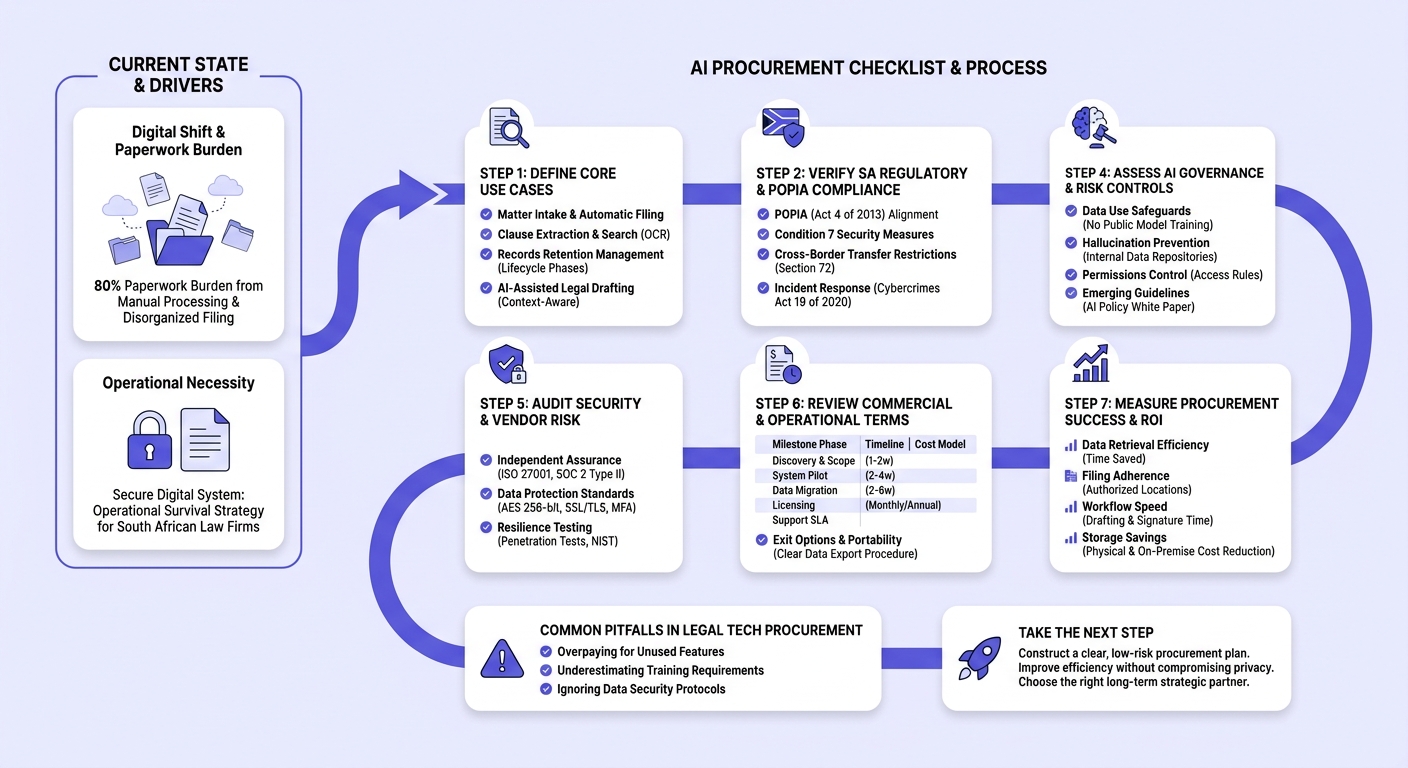
Step 1: Define Your Firm's Core Use Cases
A common purchasing mistake is choosing general consumer cloud storage and expecting it to serve as a high-performance DMS. Prior to scanning vendor lists, you must audit your practice's specific baseline needs.
- Matter Intake and Automatic Filing: Look for tools that organize incoming correspondence directly by client matter numbering systems.
- Clause Extraction and Search: Attorneys need global search engines that scan within PDF image files using automated optical character recognition (OCR) and categorize reusable legal clauses.
- Records Retention Management: The system must structure matter files safely through different lock-down lifecycle phases.
- AI-Assisted Legal Drafting: Assess if the tool provides context-aware suggestions directly inside document drafts to speed up the writing phase.
Step 2: Verify South African Regulatory and POPIA Compliance
South African law firms suffer immediate reputational damage and face heavy legal penalties if client data falls into the wrong hands. Your digital technology stack must align with local statutes.
Under the Protection of Personal Information Act 4 of 2013 (POPIA), law firms act as "responsible parties." Software providers are classed as "operators." You must audit every legal tech tool through the following framework:
- Condition 7 Security Measures: The vendor must implement robust security controls to prevent the loss, leakage, or unauthorized modification of private personal info.
- Cross-Border Transfer Restrictions: Under section 72 of the Protection of Personal Information Act (POPIA), you may not transfer personal information out of South Africa unless the foreign country offers an adequate level of data protection. Ensure that host servers either reside within South Africa or comply with strong, comparable privacy regimes (such as GDPR).
- Incident Response Requirements: The system must have operational procedures for rapid data breach notifications to meet the standards set out in the Cybercrimes Act 19 of 2020.

Step 3: Evaluate System Integrations and Technical Requirements
A DMS should not operate as a standalone island. If it fails to sync with your current platforms, attorneys will work outside the system, creating significant security vulnerabilities and double-handling data.
- Collaboration Platforms: Direct integration with Microsoft 365, Microsoft Teams, and Outlook is non-negotiable for busy legal practices.
- Practice Management & Billing: Sync work directly with billing suites, time trackers, and legacy database structures.
- API and Extensibility: Confirm that the software has open APIs. This allows your IT team to build custom workflows without having to pay for expensive proprietary development work.
Step 4: Assess AI Governance and Risk Controls
Integrating AI capabilities into legal workflows increases document search speeds and drafting efficiency. However, it also introduces operational risks that need careful management.
- Data Use Safeguards: Confirm that your provider does not use your firm's confidential client work to train public models. Your intellectual property must remain isolated and private.
- Hallucination Prevention: Legal software must base its search capability on clear, internal data repositories rather than predicting answers from outside sources. Check what protections are in place to stop AI errors.
- Permissions Control: The search engine must respect your existing access rules. A junior clerk should not be able to retrieval-search high-value corporate merger files or executive salary details.
- Emerging Guidelines: Ensure that tools align with South African regulatory guidance, such as the Department of Communications and Digital Technologies' AI Policy White Paper, to guarantee transparency and algorithmic accountability.
Step 5: Audit Information Security and Vendor Risk
Do not simply rely on a software provider's marketing promises. Require objective, third-party proof that details the vendor's cybersecurity setup.
- Independent Assurance Audits: Request the vendor's ISO/IEC 27001 certification or SOC 2 Type II assessment reports. These show that the vendor maintains a mature information security program.
- Data Protection Standards: Check that the solution utilizes strong AES 256-bit encryption for data at rest, along with robust SSL/TLS encryption for data in transit. Ensure it supports multi-factor authentication (MFA) and provides detailed user activity logs.
- Resilience Testing: Find out if the vendor does regular external penetration testing to locate and patch system vulnerabilities before they are exploited. For reference, you can benchmark these practices against The NIST Cybersecurity Framework.
Step 6: Review Commercial and Operational Terms
To assess the total cost of ownership (TCO) and plan a realistic deployment schedule, request transparent timelines and commercial estimates from vendors.
| Milestone Phase | Implementation Focus Area | Typical Timeline & Cost Model |
|---|---|---|
| Discovery & Scope | Map current workflows and configure user permissions. | 1 to 2 weeks |
| System Pilot Phase | Run a sandbox test with a selected pilot user group. | 2 to 4 weeks |
| Data Migration | Safely migrate legacy case archives to the cloud. | 2 to 6 weeks (based on archive size) |
| Licensing Structure | Review per-user subscription fees and storage limits. | Ongoing monthly/annual billing options |
| Support SLA | Check response times, user training resources, and update windows. | Included in core SaaS agreements |
- Exit Options and Portability: When reviewing the service level agreement (SLA), check the exit terms. Ensure your agreement explicitly outlines a clear procedure to export all of your files in a highly organized, standard format (such as folder structures with XML meta-tags) if you decide to change vendors.
Step 7: Measure Procurement Success and ROI
Implementing document management systems for law firms requires a major commitment of capital and work hours. To prove this investment delivers real financial returns to your partners, track these core key performance indicators (KPIs):
- Data Retrieval Efficiency: Compare the hours spent finding complex historical agreements before and after system setup.
- Filing Adherence: Track how often files are saved inside authorized client locations versus random desktop folders.
- Workflow Speed: Measure the time spent formatting contracts, checking defined terms, and sending packages for signature.
- Storage Savings: Calculate the cost reductions achieved by shrinking your physical filing rooms and legacy on-premise hardware storage.
Common Pitfalls in Legal Tech Procurement
- Overpaying for Unused Features: Avoid paying for complex, enterprise-level products if your practice only requires a secure, high-speed document search engine and POPIA-compliant storage.
- Underestimating Training Requirements: Even the most secure software will fail if your team finds it too complex. Make sure you select a platform that prioritizes intuitive folder layouts, and choose a partner that provides structured training programs.
- Ignoring Data Security Protocols: Do not trust software providers that store corporate legal documents on unencrypted consumer servers. Always insist on seeing proof of compliance and security certification up front.
Take the Next Step
Procuring a document management platform shouldn't be a complex, high-risk process that disrupts your practice. Choosing the right legal technology is a long-term strategic decision.
If your South African firm wants to improve efficiency quickly without compromising on privacy, HyperCounsel can help you construct a clear, low-risk procurement plan tailored to your team.
Learn how our secure solutions can protect your files, accelerate search capabilities, and streamline your firm's daily operations.
Demo Assessment: Book a Demo to see our file management tools in action.
Operational Costs: Explore Our Pricing plans to find the right fit for your firm.
Frequently Asked Questions
What should a South African law firm verify before buying an AI-enabled document management system?
Firms must first verify POPIA-aligned processing pathways, server locations, access logs, and encryption methods. Next, technical buyers should check key system integrations with Microsoft 365, evaluate search speed, and verify the vendor's system security certifications (such as ISO 27001 or SOC 2 Type II audits).
How does POPIA affect document storage, indexing, and AI search tools used by law firms?
Under POPIA, any personal metadata, litigation strategies, and health records are subject to strict processing conditions. AI search tools must index this data securely within boundaries that enforce permissions. This ensures your internal teams only access information relevant to their assigned matters, preventing unauthorized internal access.
What vendor security and audit evidence should firms request during procurement?
Attorneys should request independent reliability records. These include recent ISO 27001 certificates, SOC 2 reports, and results from external security penetration tests. These documents prove the software provider regularly tests their servers to block intruders and keep your files secure.
How should a law firm compare the total cost of ownership of different legal tech platforms?
To calculate the true total cost of ownership, look beyond the basic monthly software fee. You must factor in initial configuration costs, custom integration fees, legacy data migration expenses, ongoing staff training, storage expansion options, and any fees associated with exporting your data if you choose to transition to another platform.